Integrating Mopro Native Packages Across Mobile Platforms

· 8 min read
Moven Tsai
Developer on the Mopro Team

TL; DR Mopro now ships pre-built native packages for Swift (iOS), Kotlin (Android), Flutter, and React Native.
Just one import and one build. Proving made simple!

Announcing Mopro Native Packages

We're excited to launch Mopro native packages, enabling developers to effortlessly generate and verify zero-knowledge proofs (ZKPs) directly on mobile devices. These native packages leverage Rust's performance and seamlessly integrate with popular mobile frameworks. Built using the Mopro CLI, they're available for direct import via each platform's package manager.

You can also easily create your own customized native packages by following zkmopro-docs.

FrameworkPackage ManagerDefault PackageszkEmail Packages via Mopro
Swift (iOS)Xcode / SwiftPM / CocoaPodsmopro-swift-packagezkemail-swift-package
Kotlin (Android)JitPackmopro-kotlin-packagezkemail-kotlin-package
Flutterpub.devmopro_flutter_packagezkemail_flutter_package
React Nativenpm / yarnmopro-react-native-packagezkemail-react-native-package

This blog provides a quick guide on integrating these packages into your projects, outlines how we built them (so you can customize your own), addresses challenges we overcame, and highlights future developments. Let's get started!

Import, Build, Prove - That's It

Mopro's native packages simplify the integration process dramatically. Unlike the traditional approach that requires crafting APIs, generating bindings, and manually building app templates, these pre-built packages allow developers to import them directly via package managers and immediately begin developing application logic.

For ZK projects, converting your Rust-based solutions into mobile-native packages is straightforward with Mopro. Our guide on "How to Build the Package" explains the process clearly.

For instance, our zkEmail native packages were created by first defining ZK proving and verification APIs in Rust, generating bindings with mopro build, and embedding these into native packages. The circuit is the header-only proof from zkemail.nr_header_demo.

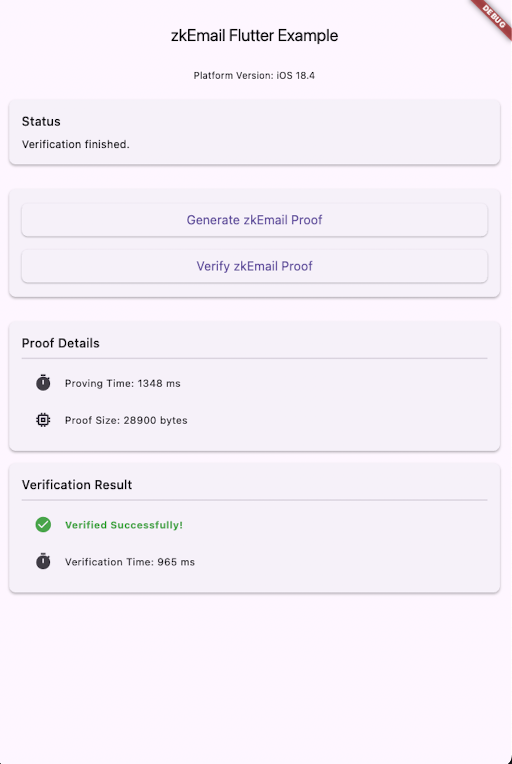
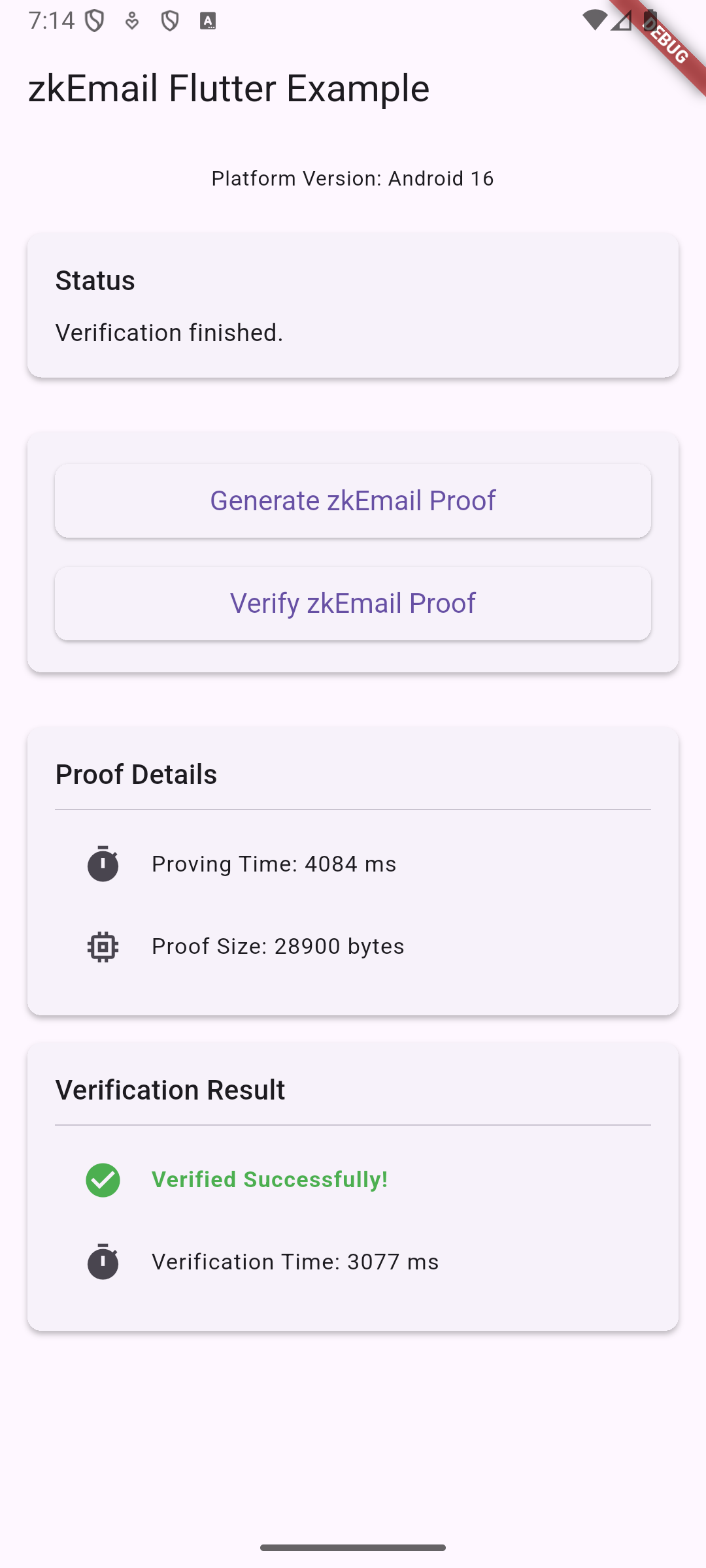
Here's how zkEmail performs on Apple M3 chips:

zkEmail OperationiOS, Time (ms)Android, Time (ms)
Proof Generation1,3093,826
Verification9622,857

iOS zkEmail App Example
iOS
Android zkEmail App Example
Android

Flutter App for iOS & Android zkEmail Example

Notice that, with Mopro and the use of Noir-rs, we port zkEmail into native packages while keeping the proof size align with Noir's Barretenberg backend CLI. It transfers the API logic directly to mobile platforms with no extra work or glue code needed!

How it worked before Mopro

Previously, integrating ZKPs into mobile applications involved more manual work and platform-specific implementations. For example, developers might have used solutions like:

These approaches often required developers to handle bridging code and manage dependencies separately for each platform, unlike the streamlined process Mopro now offers.

With Mopro, developers can leverage pre-built native packages and import them directly via package managers. This, combined with automated binding generation, significantly reduces the need for manual API crafting and platform-specific glue code.

While developers still write their application logic using platform-specific languages, Mopro simplifies the integration of core ZK functionalities, especially when leveraging Rust's extensive cryptography ecosystem.

Under The Hood

Developing native packages involved tackling several technical challenges to ensure smooth and efficient operation across different platforms.

This section dives into two key challenges we addressed:

  1. Optimizing static library sizes for iOS to manage package distribution and download speeds.
  2. Ensuring compatibility with Android's release mode to prevent runtime errors due to code shrinking.

Optimizing Static Library Sizes for iOS

Why Static Linking?

UniFFI exports Swift bindings as a static archive (libmopro_bindings.a). Static linking ensures all Rust symbols are available at link-time, simplifying Xcode integration. However, it bundles all Rust dependencies (Barretenberg Backend, rayon, big-integer math), resulting in larger archive sizes.

Baseline Size

The full build creates an archive around ≈ 153 MB in size. When uploading files over 100 MB to GitHub, Git LFS takes over by replacing the file with a text pointer in the repository while storing the actual content on a remote server like GitHub.com. This setup can cause issues for package managers that try to fetch the package directly from a GitHub URL for a release publish.

While uploading large files may be acceptable for some package management platforms or remote servers like Cloudflare R2, the large file size slows down:

  • CocoaPods or SwiftPM downloads
  • CI cache recovery
  • Cloning the repository, especially on slower connections

Our Solution: Zip & Unzip Strategy

To keep development fast and responsive, we compress the entire MoproBindings.xcframework before uploading it to GitHub and publishing it to CocoaPods, reducing its size to about ≈ 41 MB.

We also found that by customizing script_phase in the .podspec (check our implementation in ZKEmailSwift.podspec), we can unzip the bindings during pod install. This gives us the best of both worlds: (1) smaller packages for distribution and (2) full compatibility with Xcode linking. The added CPU cost is minor compared to the time saved on downloads.

Comparison With Android

On Android, dynamic .so libraries (around 22 MB in total) are used, with symbols loaded lazily at runtime to keep the package size small. In contrast, because iOS's constraint on third-party Rust dynamic libraries in App Store builds, static linking with compression is currently the most viable option, to the best of our knowledge.

Ensuring Android Release Mode Compatibility

Another challenge we tackled was ensuring compatibility with Android's release mode. By default, Android's release build process applies code shrinking and obfuscation to optimize app size. While beneficial for optimization, this process caused a java.lang.UnsatisfiedLinkError for Mopro apps.

The root cause was that code shrinking interfered with JNA (Java Native Access), a crucial dependency for UniFFI, which we use for Rust-to-Kotlin bindings. The shrinking process was removing or altering parts of JNA that were necessary for the bindings to function correctly, leading to the UnsatisfiedLinkError when the app tried to call the native Rust code.

The Fix: Adjusting Gradle Build Configurations

Our solution, as detailed in GitHub Issue #416, involves a configuration adjustment in the consuming application's android/build.gradle.kts file (or android/app/build.gradle for older Android projects). Developers using Mopro need to explicitly disable code and resource shrinking for their release builds:

android {
// ...
buildTypes {
getByName("release") {
// Disables code shrinking, obfuscation, and optimization for
// your project's release build type.
minifyEnabled = false
// Disables resource shrinking, which is performed by the
// Android Gradle plugin.
shrinkResources = false
}
}
}

Impact and Future Considerations

This configuration ensures that JNA and, consequently, the UniFFI bindings remain intact, allowing Mopro-powered Android apps to build and run successfully in release mode. This approach aligns with recommendations found in the official Flutter documentation for handling similar issues. While this increases the final app size slightly, it guarantees the stability and functionality of the native ZK operations. We are also actively exploring ways to refine this in the future to allow for optimized builds without compromising JNA's functionality.

The Road Ahead

a. Manual Tweaks for Cross-Platform Frameworks

Cross-platform frameworks like React Native and Flutter require additional glue code to define modules, as they straddle multiple runtimes. Each layer needs its own integration.

For example, in our zkEmail React Native package, we use three separate wrappers.

Similarly, for our zkEmail Flutter package, a comparable set of wrappers is employed:

b. Support for Custom Package Names

Initially, we encountered naming conflicts when the same XCFramework was used in multiple Xcode projects. Addressing this to allow fully customizable package names is an ongoing effort.

Initial progress was made with updates in issue#387 and a partial fix in PR#404. Further work to complete this feature is being tracked in issue#413.

What's Next: Shaping Mopro's Future Together

Currently, the Mopro CLI helps you create app templates via the mopro create command, once bindings are generated with mopro build.

Our vision is to enhance this by enabling the automatic generation of fully customized native packages. This would include managing all necessary glue code for cross-platform frameworks, potentially through a new command (maybe like mopro pack) or by extending existing commands. We believe this will significantly streamline the developer workflow. If you're interested in shaping this feature, we invite you to check out the discussion and contribute your ideas in issue #419.

By achieving this, we aim to unlock seamless mobile proving capabilities, simplifying adoption for developers leveraging existing ZK solutions or porting Rust-based ZK projects. Your contributions can help us make mobile ZK development more accessible for everyone!

If you find it interesting, feel free to reach out to the Mopro team on Telegram: @zkmopro, or better yet, dive into the codebase and open a PR! We're excited to see what the community builds with Mopro.

Happy proving!

2025 ETHTaipei Workshop

· 9 min read
Vivian Jeng
Developer on the Mopro Team

Overview

This tutorial guides developers through getting started with Mopro and building a native mobile app from scratch. It covers

info

This is a workshop tutorial from ETHTaipei 2025 in April. If you'd like to follow along and build a native mobile app, please check out this commit: 085fa41.

  • We also offer comprehensive iOS and Android tutorials to guide you through the entire process, ensuring you don’t miss anything!

    • iOS

    • Android

0. Prerequisites

  • XCode or Android Studio
    • If you're using Android Studio, ensure that you follow the Android configuration steps and set the ANDROID_HOME environment variable.
  • Rust and CMake

1. Download Mopro CLI tool

We offer a convenient command-line tool called mopro to streamline the development process. It functions similarly to tools like npx create-react-app or Foundry, enabling developers to get started quickly and efficiently.

git clone https://github.com/zkmopro/mopro
cd mopro/cli
cargo install --path .
cd ../..

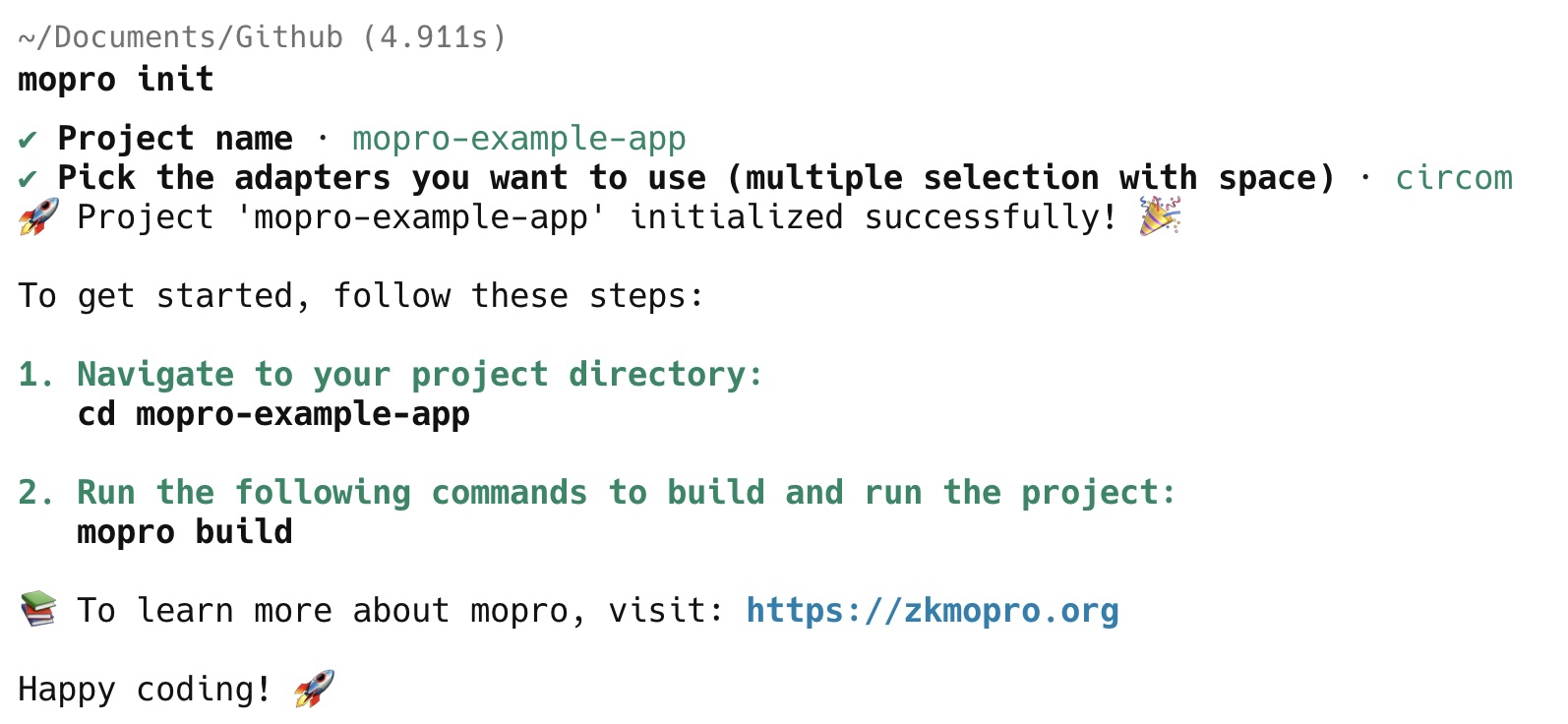
2. Initialize a project with Mopro CLI

The mopro init command helps you create a Rust project designed to generate bindings for both iOS and Android. This step is similar to running npx create-react-app, so select the directory where you want to create your new app.

mopro init

Start by selecting a name for your project (default: mopro-example-app).

Next, choose the proving system that best fits your needs—Mopro currently supports both circom and halo2. For this example, we’ll be using circom.

mopro init

Next, navigate to your project directory by running:

cd mopro-example-app

3. Build Rust bindings with mopro CLI

mopro build command can help developers build binaries for mobile targets (e.g. iOS and Android devices).

mopro build
  • Choose debug for faster builds during development or release for optimized performance in production.

  • Select the platforms you want to build for: ios, android, web.

  • Select the architecture for each platform:

    • iOS:
ArchitectureDescriptionSuggested
aarch64-apple-iosFor physical iOS devices
aarch64-apple-ios-simFor M-series Mac simulators
x86_64-apple-iosFor Intel-based Mac simulators-
  • Android:
ArchitectureDescriptionSuggested
x86_64-linux-androidFor 64-bit Intel architecture (x86_64)
i686-linux-androidFor 32-bit Intel architecture (x86)-
armv7-linux-androideabiFor 32-bit ARM architecture (ARMv7-A)-
aarch64-linux-androidFor 64-bit ARM architecture (ARMv8-A)

mopro build

warning

The build process may take a few minutes to complete.

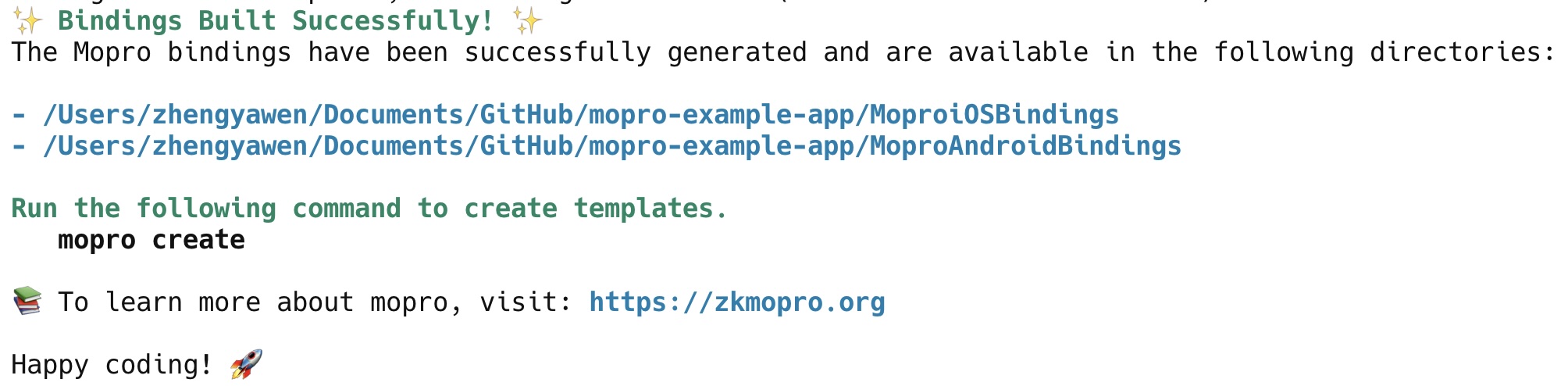
Next, you will see the following instructions displayed:

mopro-build-finish

4. Create templates for mobile development

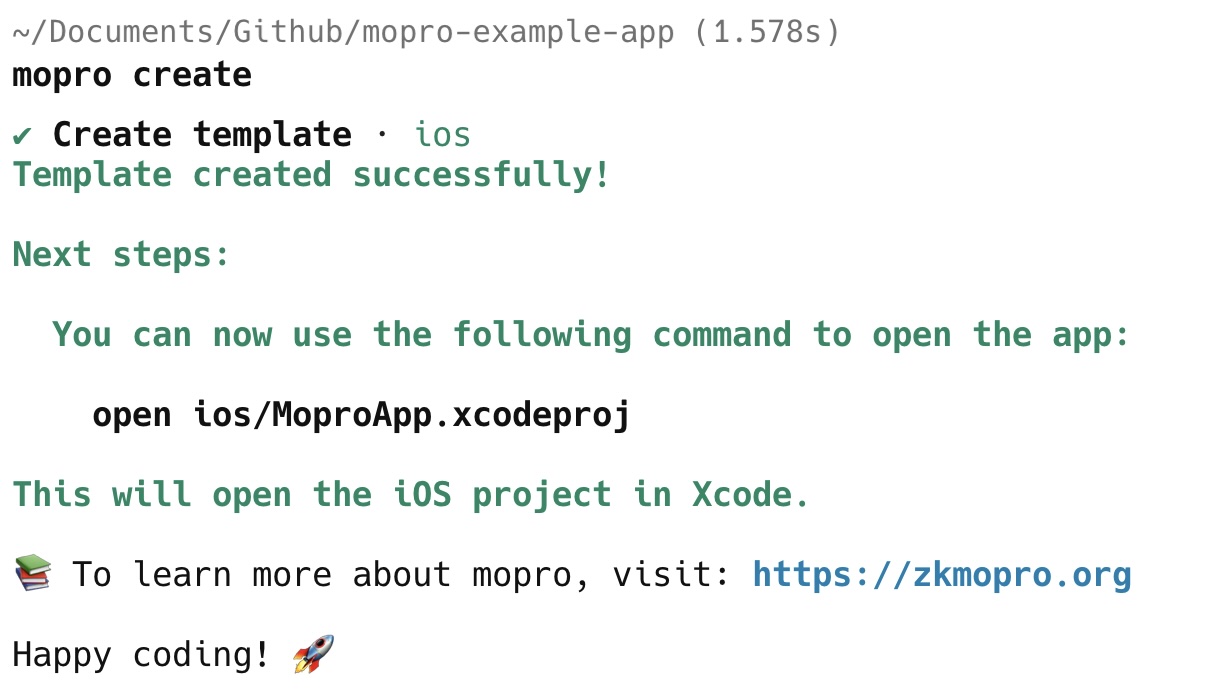
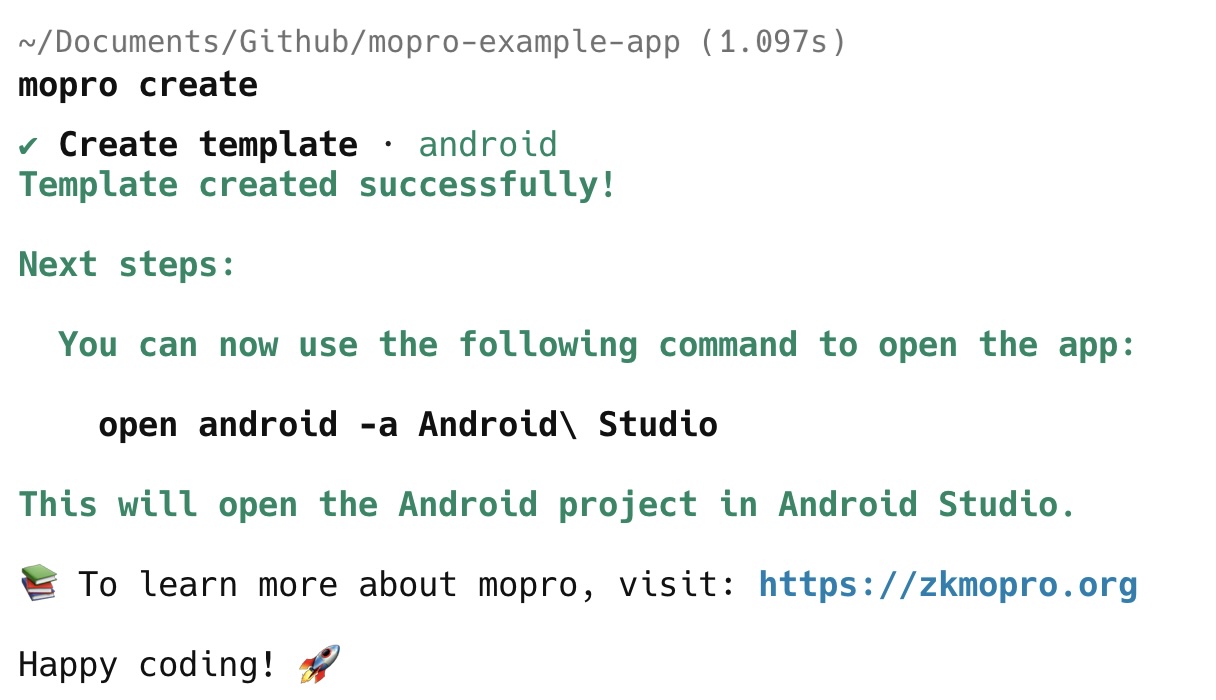
mopro create command generates templates for various platforms and integrates bindings into the specified directories.

mopro create

Currently supported platforms:

  • iOS (Xcode project)
  • Android (Android Studio project)
  • React Native
  • Flutter
  • Web

After running the mopro create command, a new folder will be created in the current directory, such as:

  • ios
  • android
  • react-native
  • flutter
  • web (currently does not support Circom prover)

You will then see the following instructions to open the project:

mopro-create

If you want to create multiple templates, simply run mopro create again and select a different framework each time.

mopro-create-android

5. Run the app on a device/simulator

iOS

Open the Xcode project by running the following command:

open ios/MoproApp.xcodeproj

Select the target device and run the project by pressing cmd + R.

Alternatively, you can watch this video to see how to run the app.

Android

Open the Android Studio project by running the following command:

open android -a Android\ Studio

Run the project by pressing ^ + R or ctrl + R.

Alternatively, you can watch this video to see how to run the app.

6. Update circuits

This section explains how to update circuits with alternative witness generators and corresponding zkey files. We use the Keccak256 circuit as a reference example here.

  1. Add wasm and zkey file in the test-vectors/circom folder

  2. In src/lib.rs file, update the circuit's witness generator function definition.

    -  rust_witness::witness!(multiplier2);
    + rust_witness::witness!(keccak256256test);

    mopro_ffi::set_circom_circuits! {
    - ("multiplier2_final.zkey", WitnessFn::RustWitness(multiplier2_witness))
    + ("keccak256_256_test_final.zkey", WitnessFn::RustWitness(keccak256256test_witness))
    }
    warning

    The name should match the lowercase version of the WASM file, with all special characters removed.
    e.g.
    multiplier2 -> multiplier2
    keccak_256_256_main -> keccak256256main
    aadhaar-verifier -> aadhaarverifier

  3. Similar to Step 3, regenerate the bindings to reflect the updated circuit.

    mopro build
  4. Manually update the bindings in the app by replacing the existing ones.

    • iOS:

      • Replace ios/MoproiOSBindings with MoproiOSBindings.
    • Android:

      • Replace android/app/src/main/jniLibs with MoproAndroidBindings/jniLibs

      • Replace android/app/src/main/java/uniffi with MoproAndroidBindings/uniffi

    info

    We aim to provide the mopro update CLI tool to assist with updating bindings. Contributions to this effort are welcome.https://github.com/zkmopro/mopro/issues/269

  5. Copy zkeys to assets

    • iOS:
      Open Xcode, drag in the zkeys you plan to use for proving, then navigate to the project’s Build Phases. Under Copy Bundle Resources, add each zkey to ensure it's included in the app bundle.

      Alternatively, you can watch this video to see how to copy zkey in XCode.

    • Android
      Paste the zkey in the assets folder: android/app/src/main/assets.

      Alternatively, you can watch this video to see how to copy zkey in XCode.

  6. Update circuit input and zkey path

  • Update zkeyPath to keccak256_256_test_final

    • iOS:
    - private let zkeyPath = Bundle.main.path(forResource: "multiplier2_final", ofType: "zkey")!
    + private let zkeyPath = Bundle.main.path(forResource: "keccak256_256_test_final", ofType: "zkey")!
    • Android:
    - val zkeyPath = getFilePathFromAssets("multiplier2_final.zkey")
    + val zkeyPath = getFilePathFromAssets("keccak256_256_test_final.zkey")
  • Update circuit inputs: https://ci-keys.zkmopro.org/keccak256.json

    • iOS:
    - let input_str: String = "{\"b\":[\"5\"],\"a\":[\"3\"]}"
    + let input_str: String = "{\"in\":[\"0\",\"0\",\"1\",\"0\",\"1\",\"1\",\"1\",\"0\",\"1\",\"0\",\"1\",\"0\",\"0\",\"1\",\"1\",\"0\",\"1\",\"1\",\"0\",\"0\",\"1\",\"1\",\"1\",\"0\",\"0\",\"0\",\"1\",\"0\",\"1\",\"1\",\"1\",\"0\",\"0\",\"0\",\"0\",\"0\",\"0\",\"0\",\"0\",\"0\",\"0\",\"0\",\"0\",\"0\",\"0\",\"0\",\"0\",\"0\",\"0\",\"0\",\"0\",\"0\",\"0\",\"0\",\"0\",\"0\",\"0\",\"0\",\"0\",\"0\",\"0\",\"0\",\"0\",\"0\",\"0\",\"0\",\"0\",\"0\",\"0\",\"0\",\"0\",\"0\",\"0\",\"0\",\"0\",\"0\",\"0\",\"0\",\"0\",\"0\",\"0\",\"0\",\"0\",\"0\",\"0\",\"0\",\"0\",\"0\",\"0\",\"0\",\"0\",\"0\",\"0\",\"0\",\"0\",\"0\",\"0\",\"0\",\"0\",\"0\",\"0\",\"0\",\"0\",\"0\",\"0\",\"0\",\"0\",\"0\",\"0\",\"0\",\"0\",\"0\",\"0\",\"0\",\"0\",\"0\",\"0\",\"0\",\"0\",\"0\",\"0\",\"0\",\"0\",\"0\",\"0\",\"0\",\"0\",\"0\",\"0\",\"0\",\"0\",\"0\",\"0\",\"0\",\"0\",\"0\",\"0\",\"0\",\"0\",\"0\",\"0\",\"0\",\"0\",\"0\",\"0\",\"0\",\"0\",\"0\",\"0\",\"0\",\"0\",\"0\",\"0\",\"0\",\"0\",\"0\",\"0\",\"0\",\"0\",\"0\",\"0\",\"0\",\"0\",\"0\",\"0\",\"0\",\"0\",\"0\",\"0\",\"0\",\"0\",\"0\",\"0\",\"0\",\"0\",\"0\",\"0\",\"0\",\"0\",\"0\",\"0\",\"0\",\"0\",\"0\",\"0\",\"0\",\"0\",\"0\",\"0\",\"0\",\"0\",\"0\",\"0\",\"0\",\"0\",\"0\",\"0\",\"0\",\"0\",\"0\",\"0\",\"0\",\"0\",\"0\",\"0\",\"0\",\"0\",\"0\",\"0\",\"0\",\"0\",\"0\",\"0\",\"0\",\"0\",\"0\",\"0\",\"0\",\"0\",\"0\",\"0\",\"0\",\"0\",\"0\",\"0\",\"0\",\"0\",\"0\",\"0\",\"0\",\"0\",\"0\",\"0\",\"0\",\"0\",\"0\",\"0\",\"0\",\"0\",\"0\",\"0\",\"0\",\"0\",\"0\",\"0\",\"0\",\"0\",\"0\",\"0\",\"0\",\"0\",\"0\",\"0\",\"0\",\"0\",\"0\"]}"
    • Android:
    - val input_str: String = "{\"b\":[\"5\"],\"a\":[\"3\"]}"
    + val input_str: String = "{\"in\":[\"0\",\"0\",\"1\",\"0\",\"1\",\"1\",\"1\",\"0\",\"1\",\"0\",\"1\",\"0\",\"0\",\"1\",\"1\",\"0\",\"1\",\"1\",\"0\",\"0\",\"1\",\"1\",\"1\",\"0\",\"0\",\"0\",\"1\",\"0\",\"1\",\"1\",\"1\",\"0\",\"0\",\"0\",\"0\",\"0\",\"0\",\"0\",\"0\",\"0\",\"0\",\"0\",\"0\",\"0\",\"0\",\"0\",\"0\",\"0\",\"0\",\"0\",\"0\",\"0\",\"0\",\"0\",\"0\",\"0\",\"0\",\"0\",\"0\",\"0\",\"0\",\"0\",\"0\",\"0\",\"0\",\"0\",\"0\",\"0\",\"0\",\"0\",\"0\",\"0\",\"0\",\"0\",\"0\",\"0\",\"0\",\"0\",\"0\",\"0\",\"0\",\"0\",\"0\",\"0\",\"0\",\"0\",\"0\",\"0\",\"0\",\"0\",\"0\",\"0\",\"0\",\"0\",\"0\",\"0\",\"0\",\"0\",\"0\",\"0\",\"0\",\"0\",\"0\",\"0\",\"0\",\"0\",\"0\",\"0\",\"0\",\"0\",\"0\",\"0\",\"0\",\"0\",\"0\",\"0\",\"0\",\"0\",\"0\",\"0\",\"0\",\"0\",\"0\",\"0\",\"0\",\"0\",\"0\",\"0\",\"0\",\"0\",\"0\",\"0\",\"0\",\"0\",\"0\",\"0\",\"0\",\"0\",\"0\",\"0\",\"0\",\"0\",\"0\",\"0\",\"0\",\"0\",\"0\",\"0\",\"0\",\"0\",\"0\",\"0\",\"0\",\"0\",\"0\",\"0\",\"0\",\"0\",\"0\",\"0\",\"0\",\"0\",\"0\",\"0\",\"0\",\"0\",\"0\",\"0\",\"0\",\"0\",\"0\",\"0\",\"0\",\"0\",\"0\",\"0\",\"0\",\"0\",\"0\",\"0\",\"0\",\"0\",\"0\",\"0\",\"0\",\"0\",\"0\",\"0\",\"0\",\"0\",\"0\",\"0\",\"0\",\"0\",\"0\",\"0\",\"0\",\"0\",\"0\",\"0\",\"0\",\"0\",\"0\",\"0\",\"0\",\"0\",\"0\",\"0\",\"0\",\"0\",\"0\",\"0\",\"0\",\"0\",\"0\",\"0\",\"0\",\"0\",\"0\",\"0\",\"0\",\"0\",\"0\",\"0\",\"0\",\"0\",\"0\",\"0\",\"0\",\"0\",\"0\",\"0\",\"0\",\"0\",\"0\",\"0\",\"0\",\"0\",\"0\",\"0\",\"0\",\"0\",\"0\",\"0\",\"0\",\"0\",\"0\",\"0\",\"0\",\"0\",\"0\",\"0\",\"0\",\"0\",\"0\",\"0\"]}"
  1. Then Run the app again like in step 5.

7. Update Rust exported functions

Currently, only generateCircomProof and verifyCircomProof are available with the bindings, but the bindings can be extended to support nearly all Rust functions.

Here is an example demonstrating how to use the Semaphore crate.

  1. Update Cargo.toml

    Import semaphore crate from: https://github.com/worldcoin/semaphore-rs

    info

    We are using this specific commit 340d4ad for semaphore-rs.

    Cargo.toml
    semaphore-rs = { git = "https://github.com/worldcoin/semaphore-rs", features = ["depth_16"], rev = "340d4ad"}
  2. Define a function to generate semaphore proof

    Here is an example to define semaphore prove and verify in src/lib.rs

    Alternatively, we can create a demo function called semaphore() to run the code from the README.

    src/lib.rs
    use semaphore_rs::{get_supported_depths, hash_to_field, Field, identity::Identity,
    poseidon_tree::LazyPoseidonTree, protocol::*};

    pub fn semaphore() {
    // generate identity
    let mut secret = *b"secret";
    let id = Identity::from_secret(&mut secret, None);

    // Get the first available tree depth. This is controlled by the crate features.
    let depth = get_supported_depths()[0];

    // generate merkle tree
    let leaf = Field::from(0);
    let mut tree = LazyPoseidonTree::new(depth, leaf).derived();
    tree = tree.update(0, &id.commitment());

    let merkle_proof = tree.proof(0);
    let root = tree.root();

    // change signal and external_nullifier here
    let signal_hash = hash_to_field(b"xxx");
    let external_nullifier_hash = hash_to_field(b"appId");

    let nullifier_hash = generate_nullifier_hash(&id, external_nullifier_hash);

    let proof = generate_proof(&id, &merkle_proof, external_nullifier_hash, signal_hash).unwrap();
    let success = verify_proof(root, nullifier_hash, signal_hash, external_nullifier_hash, &proof, depth).unwrap();

    assert!(success);
    }
    warning

    You can also try returning a value; otherwise, nothing will happen after execution. e.g.

    pub fn semaphore() -> bool {
    // ...
    return success;
    }
  3. Export the function through UniFFI procedural macros

    You can simply use the UniFFI proc-macros (e.g. #[uniffi::export]) to define the function interfaces.

    info

    For more details, refer to the UniFFI documentation.

    + #[uniffi::export]
    pub fn semaphore() {
    // generate identity
    let mut secret = *b"secret";
    ...
  4. Run mopro build again and manually update the bindings for iOS and Android as explained in Step 6.

  5. You can now call the semaphore() function you just defined on both iOS and Android. 🎉

8. Conclusion

Comparison of Circom Provers

· 7 min read
Vivian Jeng
Developer on the Mopro Team

Introduction

Throughout 2024, we compared various Groth16 provers for Circom. Our goal was to demonstrate that native provers (written in C++ or Rust) outperform snarkjs in terms of speed. Along the way, we uncovered some fascinating insights, which we’re excited to share with you in this post.

To understand a Groth16 prover, let’s break it down into two main components: witness generation and proof generation.

Witness Generation: This step involves processing inputs along with witness calculation functions to produce the necessary witness values for a circuit. It's a purely computational step and does not involve any zero-knowledge properties.

Proof Generation: Once the witness is generated, this step takes the witness and the zkey (generated by snarkjs) to compute the polynomial commitments and produce a succinct zero-knowledge proof.

Ideally, developers should have the flexibility to switch between different witness generation and proof generation implementations. This would allow them to leverage the fastest options available, optimizing performance and enhancing their development experience.

However, each of these tools presents unique challenges. In the following sections, we will delve into these challenges in detail and provide a comparison table for clarity.

Witness Generation

snarkjs

snarkjs is one of the most widely used tools for generating Groth16 proofs and witnesses. Written in JavaScript, it runs seamlessly across various environments, including browsers on both desktops and mobile devices. However, it faces performance challenges with large circuits. For instance, an RSA circuit can take around 15 seconds to process, while a more complex circuit like zk-email may require up to a minute to generate a proof. This highlights the need for optimized solutions, such as leveraging mobile-native capabilities and even mobile GPUs, to significantly enhance performance.

witnesscalc

witnesscalc is a lightweight, C++-based tool designed for efficient witness generation for circuits compiled with Circom. It offers a faster alternative to JavaScript-based tools like snarkjs. With cross-platform support and compatibility with other ZKP tools, Witnesscalc is ideal for handling performance-sensitive applications and large circuits.

While Witnesscalc performs exceptionally well with circuits such as RSA, Anon Aadhaar, Open Passport, and zkEmail, integrating it into Mopro presents challenges due to its C++ implementation, whereas Mopro is built on Rust. We are actively working to bridge this gap to leverage its performance benefits within the mobile proving ecosystem.

wasmer

One option available in Rust is circom-compat, maintained by the Arkworks team. This library uses the .wasm file generated by Circom and relies on the Rust crate wasmer to execute the witness generation. However, wasmer doesn’t run natively on devices—it creates a WebAssembly execution environment for the .wasm file. As a result, the performance of wasmer is comparable to the WebAssembly performance of snarkjs running in a browser.

Initially, we encountered memory issues with wasmer during implementation (issue #1). Later, we discovered that the Apple App Store does not support any wasmer functions or frameworks, making it impossible to publish apps using this solution on the App Store or TestFlight (issue #107). As a result, we decided to abandon this approach for Mopro.

circom-witness-rs

Another Rust-based option is circom-witness-rs, developed by the Worldcoin team. Unlike solutions that rely on WebAssembly (wasm) output from the Circom compiler, this tool directly utilizes .cpp and .dat files generated by Circom. It employs the cxx crate to execute functions within the .cpp files, enhanced with optimizations such as dead code elimination. This approach has demonstrated excellent performance, particularly with Semaphore circuits. However, we discovered that it encounters compatibility issues with certain circuits, such as RSA, limiting its applicability for broader use cases.

circom-witnesscalc

The team at iden3 took over this project and began maintaining it under the name circom-witnesscalc. While it heavily draws inspiration from circom-witness-rs, it inherits the same limitation—it does not support RSA circuits. For more details, refer to the "Unimplemented Features" section in the README.

rust-witness

Currently, Mopro utilizes a tool called rust-witness, developed by a member of the Mopro team. This tool leverages w2c2 to translate WebAssembly (.wasm) files into portable C code. By transpiling .wasm files from Circom into C binaries, rust-witness has demonstrated compatibility across all circuits and platforms tested so far, including desktop, iOS, and Android. Additionally, its performance has shown to be slightly better than that of wasmer.

Proof Generation

snarkjs

As mentioned earlier, snarkjs is the most commonly used tool for generating Groth16 proofs. However, its performance still has room for improvement.

rapidsnark

Rapidsnark, developed by the iden3 team, is an alternative to snarkjs designed to deliver faster Groth16 proof generation. Similar to witnesscalc, it is written in C++. While it shows promising performance, we are still working on integrating it into Mopro.

ark-works

The primary Rust-based option is circom-compat, maintained by the Arkworks team. Arkworks is a Rust ecosystem designed for programmable cryptography, deliberately avoiding dependencies on native libraries like gmp. In our experiments, Arkworks has proven to work seamlessly with all circuits and platforms. If you have Rust installed, you can easily execute Groth16 proving using Arkworks without any issues. As a result, Mopro has adopted this approach to generate proofs for cross-platform applications.

Comparison Table

Here, we present a table comparing different witness generators and proof generators to provide a clearer understanding of their features and performance.

In this comparison, we use circom-witnesscalc as a representative for both circom-witness-rs and circom-witnesscalc, as they share fundamentally similar implementations and characteristics.

Witness Generatorsnarkjswitnesscalcwasmercircom-witnesscalcrust-witness
Performanceslowthe fastest 🚀slowsometimes fastest 🚀slightly faster than snarkjs
Supported CircuitsallallallRSA not supportedall
LanguageJavaScriptC++RustRustRust
Browser
Desktop
iOS
Android
Mopro Support⚠️ WIP 1❌ Abandoned⚠️ Possible 2
Proof Generatorsnarkjsrapidsnarkarkworks
Performanceslowthe fastest 🚀fast
Supported Circuitsallallall
LanguageJavaScriptC++Rust
Browser3
Desktop
iOS
Android
Mopro Support⚠️ WIP 4

Conclusion

In conclusion, we found that the witnesscalc and rapidsnark stack offers the best performance, but integrating it into Rust presents significant challenges. These tools rely heavily on C++ and native dependencies like gmp, cmake, and nasm. Our goal is to integrate these tools into Rust to make them more accessible for application development. Similar to how snarkjs seamlessly integrates into JavaScript projects like Semaphore and ZuPass, having a Rust-compatible stack would simplify building cross-platform applications. Providing only an executable limits flexibility and usability for developers. In 2025, we are prioritizing efforts to enable seamless integration of these tools into Rust or to provide templates for customized circuits.

We recognize the difficulty in choosing the right tools and are committed to supporting developers in this journey. If you need assistance, feel free to reach out to the Mopro team on Telegram: @zkmopro.

Footnotes

  1. We are actively working on integrating witnesscalc into Mopro. Please refer to issue #284

  2. Please refer to PR #255 to see how to use circom-witnesscalc with Mopro.

  3. waku-org has investigated this approach; however, it does not outperform snarkjs in terms of performance. Please refer to this comment for more details.

  4. We are actively working on integrating rapidsnark into Mopro. Please refer to issue #285